
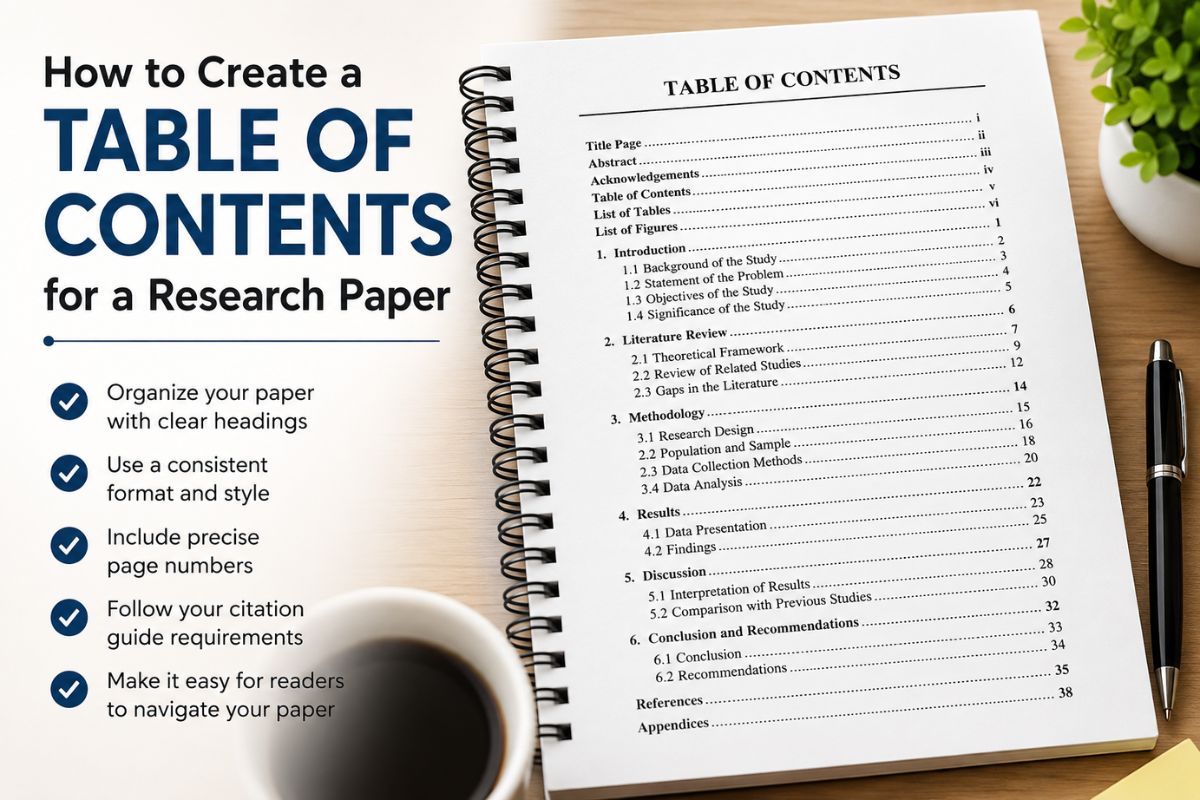
How to Create a Table of Contents for a Research Paper
Every long research paper runs into the same problem: readers need to find a section without flipping through fifty pages to get there. A table of contents solves this in one glance, listing every heading and its page number before the reader reaches the introduction.
Not every paper needs one. Short journal articles or single-topic essays usually skip it, since there’s little to navigate. Theses, dissertations, and longer academic papers are a different story with multiple chapters and subsections. A clear list at the front isn’t optional so much as expected by most institutions.
What Is A Table Of Contents
A ToC is a structured list of a paper’s chapters, sections, and subsections, each paired with the page number where it starts. It gives a reader a map of the document before they read a single page of content.
Two things make it work: consistent headings that mirror the body exactly and accurate page numbers that don’t drift when the document gets edited. Get those two right, and everything else is formatting.
It matters most in longer academic work, dissertations, theses, and term papers, since these are the documents readers actually need to navigate rather than read start to finish. A short paper rarely needs this level of structure.
How to Format a Table of Contents
Formatting follows the same rules as the rest of your paper. Use the same font and size as your body text, whether that’s Times New Roman 12pt or Arial 11pt. Headings stay left-aligned, page numbers sit flush right, and dot leaders connect the two so the eye can track across the page without losing the line.
Subsections need indentation to show hierarchy. A Level 2 heading sits slightly indented under its Level 1 parent, and a Level 3 heading indents further still. This visual spacing is what tells a reader how the paper is organized before they’ve read a single page of it.
Quick Format Checklist
- Match font and size to the body text
- Left-align headings, right-align page numbers
- Use dot leaders between the two
- Indent subsections by heading level
- Keep spacing consistent from top to bottom
This is really the core of any research paper table of contents guide, since formatting is where most inconsistencies actually show up.
List Headings and Page Numbers
A functional table lists three things: section headings, their subheadings, and the page number where each one starts. That’s the whole structure nothing more needs to be forced in.
The Core Elements
- Main headings: Introduction, Methods, Results, Discussion, and similar top-level sections
- Subheadings: smaller divisions within a chapter, like “Data Collection” under Methods
- Page numbers: right-aligned, matching exactly where each section begins in the document
Keep the wording identical to what’s used in the body. If a heading reads “Literature Review” on page five, it should read the same way in the list, not shortened or rephrased. That consistency is what makes a Table of Contents for a paper actually usable instead of just decorative.
Place It After the Title Page
In APA format, the table goes after the title page and before the abstract, not after it, which is a common mix-up. This keeps the structure visible before the reader even reaches the summary of the study.
When It Shifts
Some universities and journals ask for a different order, usually placing it after the abstract or acknowledgments instead. Always check the specific style guide or department requirements before finalizing placement, since APA itself doesn’t mandate one fixed position.
Getting this right early saves a full reformat later, one more reason a clear research paper table of contents guide is worth keeping close while drafting.
Assign Heading Levels First
Nothing generates correctly until headings are tagged properly. Before touching any auto-generate tool, go through the document and mark each heading with its level, Level 1 for main chapters, Level 2 for subsections, and Level 3 for smaller breakdowns within those. Skipping this step is the single biggest reason a generated list comes out wrong or incomplete.
Most word processors apply this through a heading style menu rather than manual formatting, so bold text alone won’t register. The level has to be selected from the style options for the software to recognize it as a heading at all.
| Level | Used For | Example |
| Level 1 | Main chapters | Introduction, Methodology |
| Level 2 | Subsections | Data Collection |
| Level 3 | Smaller breakdowns | Survey Design |
Setting this up early is what turns a Table of Contents in a paper from a manual chore into something built almost automatically.
Generate It in Word or Google Docs
Both tools build this automatically once heading levels are set, so there’s no need to type entries or count pages by hand.
In Microsoft Word
- Place the cursor on the page where the list should appear
- Open the References tab
- Click Table of Contents and choose an automatic style
- Update it anytime the document changes
In Google Docs
- Place the cursor on the target page
- Go to Insert, then Table of Contents
- Choose the dotted or linked style
One glitch worth watching for: if a Level 3 heading sits in the same paragraph as the text that follows it, the software can pull that entire paragraph into the list instead of just the heading. Turning on formatting marks to check for a proper line break before generating usually catches this before it becomes a mess.
Once set up correctly, this same process works as a reusable table of contents template for a paper you’ll likely format more than once.
Table of Contents Example
Here’s a table of contents layout example that follows standard academic formatting, dot leaders, right-aligned page numbers, and indentation showing exactly how each level nests under the one above it.
Standard Layout
| Section | Page |
| Abstract | iii |
| 1. Introduction | 1 |
| 1.1 Background of the Study | 2 |
| 1.2 Statement of the Problem | 4 |
| 2. Literature Review | 6 |
| 2.1 Theoretical Framework | 6 |
| 2.2 Empirical Studies | 9 |
| 3. Methodology | 14 |
| 4. Results | 19 |
| 5. Discussion | 25 |
| References | 31 |
| Appendices | 33 |
What Makes This Layout Work
This table of contents layout example follows the standard numbering pattern used across most academic papers. Chapter titles get whole numbers, and subsections get decimals tied to their parent chapter, so 1.1 and 1.2 both fall under Introduction without any confusion about where they belong. This format is common in scientific and technical papers because it lets a reader jump straight to a subsection without scanning through the whole chapter first.
References and Appendices sit at the end without chapter numbers, since they’re supporting material rather than part of the paper’s argument. That distinction matters. An appendix full of raw survey data doesn’t carry the same weight as a results chapter, and the layout should reflect that.
For longer academic work, this same structure just extends further. A sample table of contents for a thesis usually adds more subsections and sometimes a fourth heading level, but the numbering logic and page alignment stay identical to what’s shown here.
Skip These Sections
Not everything in a paper belongs in the list. Acknowledgments and dedications are personal additions, not structural sections, so most style guides leave them out entirely. The same goes for minor sub-points inside a chapter. Things like a single example or a short aside don’t need their own line.
Overloading the list with every small heading defeats its purpose. A reader scanning it should see the paper’s major structure in a few seconds, not sift through ten sub-entries under one chapter to find what they need.
Commonly Left Out
- Acknowledgments
- Dedication page
- Minor headings with no real content of their own
- Anything already covered by a broader section above it
FAQs
Does a research paper need a table of contents?
Not always. Short journal articles or single-topic papers usually skip it. Longer academic work like theses and dissertations typically requires one, even though APA itself doesn’t mandate it.
Where does the table of contents go in a research paper?
It usually sits after the title page and before the abstract in APA format, though some institutions place it after the abstract instead. Always confirm with the specific style guide.
What is the proper format for a table of contents?
The whole list should match the font, size, and spacing of the main paper. Headings stay left-aligned, page numbers sit flush right, and dot leaders connect the two for easy scanning.
Does TOC always mean table of contents?
In most academic writing, yes. In chemistry and other scientific journals, a scientific table of contents can also refer to a TOC graphic, a single summary image used to represent the paper online rather than a list of sections.
How long should a table of contents be?
For most research papers, one page is enough. Longer theses or dissertations with multiple chapters and subsections may extend to two pages, but anything beyond that usually signals the list needs trimming.
Conclusion
A table of contents does one job well: it turns a long, complex paper into something a reader can navigate in seconds. Get the headings consistent, the levels assigned correctly, and the formatting matched to the rest of your paper, and the rest builds itself through the automatic tools already covered.
Whether it’s a short research paper or a full dissertation, the same rules apply. Set it up once, keep it updated as the document grows, and it’ll do exactly what a table of contents is meant to do.
